ReadEra – book reader pdf epub
- 4.9
- Rating
- 50.00M
- Installs
- Free
- Price

 Analysis by App-foxy
I spend a lot of time moving between novels, manuals, saved articles, and work documents, so I tend to judge a reading app by what happens after the first file is opened. Does it make text comfortable to follow? Can I find my place again without thinking? Does it remain useful when my attention, eyesight, device, or surroundings are not ideal? ReadEra – book reader pdf epub has earned a place in that kind of routine because it focuses on one job: bringing many common reading formats together in a clean, practical reader.
Developed by READERA LLC, this free Books & Reference app supports PDF, EPUB, Word, Kindle, and MOBI files. That range matters more to me than a long list of decorative extras. I can keep a novel, a scanned reference file, and a document from work in the same reading environment instead of switching between several specialized apps. The experience is not perfect for every reader or every document, but it is unusually easy to understand once a personal library starts to grow.
How ReadEra handles reading, navigation, and different abilities
I find the most useful accessibility question is not simply whether a reader looks uncluttered, but whether its file format lets me adjust the experience without losing my place in the page. This section looks at how ReadEra’s straightforward navigation can lower the effort of returning to a book, while also showing why fixed-layout documents may call for a different device or reading setup.
You May Also Like

 AccuWeather: Weather Radar
AccuWeather Review: A Quick, Clear Forecast for Everyday Decisions
For everyday plans, the best forecast is the one you can understand quickly. AccuWeather makes rain timing, radar, and local conditions easy to act on, with a few trade-offs.

 Hill Climb Racing
Why Hill Climb Racing Still Turns Crashes Into One More Run
A tiny car, a bumpy hill and one more upgrade: Hill Climb Racing keeps resurfacing because its simple chaos makes every near-miss feel personal.

 AliExpress - Shopping App
AliExpress Makes Global Shopping Feel Personal, but Shoppers Bear the Risk
AliExpress turns a global marketplace into a pocket-sized discovery engine. Its reach is useful, its shopping loop compelling, and its trade-offs easy to miss.

 Lords Mobile: Kingdom Wars
Lords Mobile Is a Kingdom-Building Routine, Not a Quick Match
A case-by-case verdict on the building, battles, device demands, and social commitments that make Lords Mobile rewarding for some players and exhausting for others.

 PDF Scanner app - TapScanner
TapScanner Makes Paperwork Easier to Capture, Check, and Share
TapScanner makes scanning with a phone feel less like a rescue operation and more like a dependable step in getting work done. Its capture tools are useful, though not flawless.

 Block Blast!
 Shows How Much a Puzzle Game Can Leave Out
A quiet grid game shows why puzzle players increasingly value instant clarity, repeatable skill and low-pressure play—and where the genre still needs to catch up.
More From Our News Desk
View All News


A calm library is more useful than a crowded bookshelf
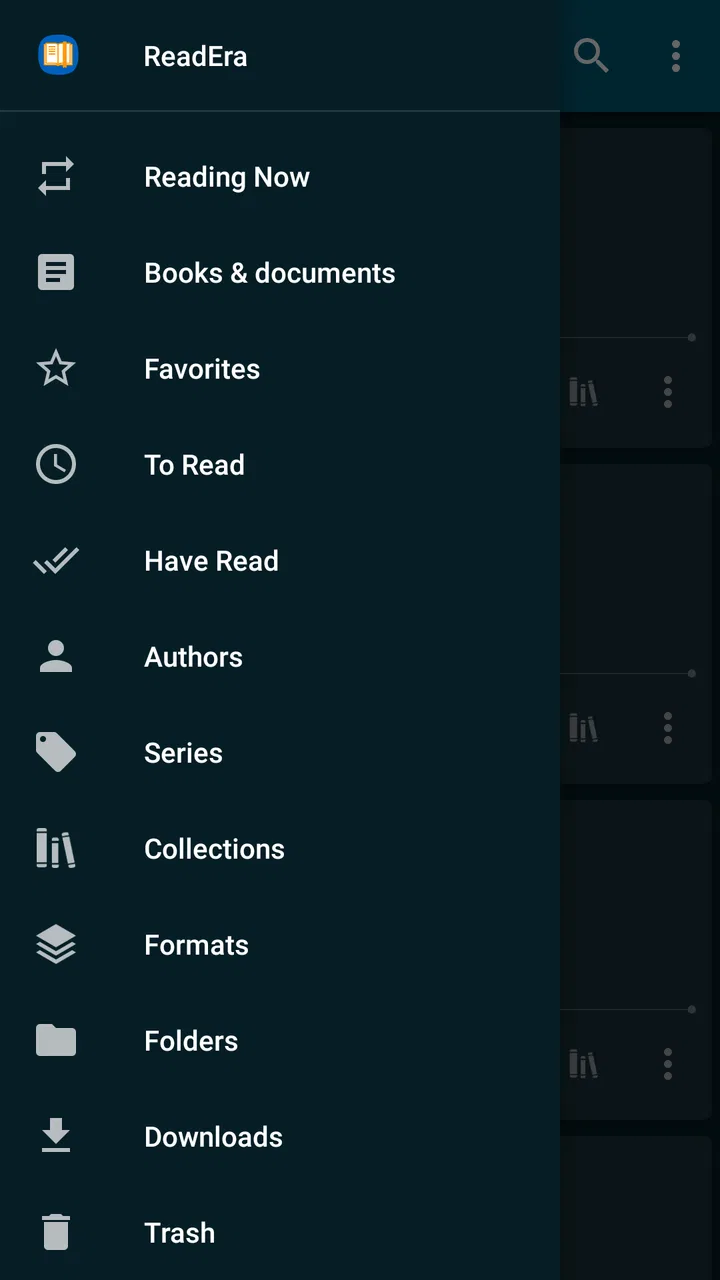
The first thing I notice is that the app is built around recognition rather than complicated menus. Books and documents are presented as things I can identify, open, and continue reading. That sounds basic, but it reduces the mental work involved in deciding where to go next. For someone who reads several titles at once, this is more comfortable than an app that treats every file as a separate import project.
I find this particularly helpful when my reading is fragmented. I might read a few pages of a novel at night, consult a PDF during the day, and return to a Word document later. A reader that makes those transitions feel ordinary is easier to live with than one designed only for a single bookstore ecosystem. ReadEra is best understood as a flexible local reading shelf, not as a store or social network built around recommendations.
The broad format support is one of its strongest practical advantages. EPUB and MOBI are generally associated with reflowable books, while PDF files often preserve a fixed page design and Word documents can behave differently again. Having them available in one app does not make those formats identical, but it does mean I can use one familiar reading space for very different material. That is a real benefit for students, commuters, independent readers, and anyone whose library comes from more than one source.
Reflowable books and fixed pages demand different habits
For an EPUB or another reflowable book, reading is usually the most relaxed experience because the text can fit the screen more naturally. I can concentrate on the words instead of constantly managing the page. This is where the app feels closest to a traditional ebook reader: open the book, settle into the page, and continue without unnecessary friction.
PDFs are a different story. A PDF may be a carefully designed digital book, a scanned handout, or a page intended for a large desktop screen. ReadEra can open that kind of material, but the quality of the experience depends heavily on the document itself and the size of the phone or tablet. Small columns, wide tables, and scanned pages can still require zooming and panning. That is not a failure unique to this app; it is the unavoidable trade-off of preserving a fixed layout on a small display.
My practical advice is to treat EPUB as the better choice for long, text-heavy reading whenever the same title is available in both formats. I reserve PDF for documents where page design matters, such as forms, illustrated manuals, academic layouts, or files that must look the same on every device. This simple choice does more for comfort than repeatedly adjusting a reader after opening a poorly suited file.
Navigation that helps when attention is limited
ReadEra works well for readers who dislike visual clutter or who lose their place easily. A focused reading screen makes it easier to return to the actual text rather than wander through recommendations, comments, or store promotions. I also appreciate that the app’s purpose is immediately clear: it is there to read the files I already have.
That simplicity can support people with different cognitive needs. If I am tired, distracted, or switching between tasks, I do not want to reconstruct a complicated workflow before I can continue a chapter. The app is a good fit for short reading sessions because the path from library to page is straightforward. It also suits people who prefer private reading over public progress tracking.
There is a useful distinction here between a simple interface and an accessible interface. Simplicity lowers cognitive load, but it does not automatically solve every visual, motor, or sensory barrier. A reader may still need larger system text, stronger contrast, a physical keyboard, or another assistive setup. I would describe ReadEra as a considerate general-purpose reader rather than a specialized accessibility tool.
Small habits that improve long sessions
One of my most useful habits is to prepare the file before starting a serious reading session. If I have a choice, I use a reflowable format for a phone and keep fixed-layout PDFs for a larger screen. I also avoid judging the whole app by one badly formatted document. A messy source file can make any reader feel difficult, especially when its text is embedded as an image rather than selectable characters.
For long sessions, I take a moment to choose the device that matches the material. A phone is convenient for novels and short documents because it is always available. A tablet is more comfortable for diagrams, wide pages, and technical PDFs. ReadEra’s value is that the reading environment stays familiar while the screen changes, but the app cannot remove the physical limits of a small display.
Another useful workflow is to keep reading material organized before opening it. A folder structure that separates novels, reference documents, and temporary files makes the library easier to scan. This is not a glamorous feature, but it matters for users with large collections. The less time I spend searching for the right file, the more energy I have for reading itself.
Motor and sensory considerations in everyday use
For motor accessibility, the main advantage is the reduced number of steps. Opening a file and returning to reading does not require a complex series of actions. That helps when precise tapping is tiring or when I am using the app one-handed. Still, reading a dense PDF can demand repeated zooming and panning, which is more physically demanding than turning through a well-formatted EPUB.
People who rely on larger touch targets or have difficulty with small controls should test the app with their usual device settings. A larger screen may make controls easier to reach, while a phone can be more convenient for someone who needs to hold the device close. I would not promise that every control will suit every motor profile, but the uncluttered reading purpose gives it a better starting point than an app overloaded with secondary actions.
For visual comfort, the format of the book is again important. Reflowable text is usually easier to adapt to a preferred reading size than a fixed page. A PDF designed for paper may become awkward when enlarged because the reader must move around the page. Someone with low vision should therefore choose accessible, text-based files where possible instead of assuming that every PDF will behave like an ebook.
Readers sensitive to visual distraction may appreciate the restrained approach. There is less competing content than in a bookstore app or a reading community. On the other hand, people who need a very specific combination of contrast, spacing, font treatment, or screen-reader behavior should evaluate the app with their own assistive settings. General comfort is not the same as guaranteed compatibility.
When the surroundings change
ReadEra is especially practical in situations where connectivity or attention is inconsistent. I can use it for a book during a commute, a document while traveling, or reference material away from a desk, provided the files are already available on the device. That local-library approach removes the need to depend on a live storefront every time I want to read something I already own.
A realistic example is a train journey with several different reading needs. I might begin a novel, switch to a saved PDF for a course, and check a Word document before arriving. Instead of carrying three separate reading workflows, I can move between them in one app. The benefit is not just convenience; it also reduces the number of interfaces I need to remember when the trip is noisy, crowded, or rushed.
It can also suit people who share devices or move between personal and study material, although organization becomes more important in that situation. A clear file structure helps prevent the library from becoming confusing. I would be more cautious for confidential documents on a shared phone, not because of a specific policy claim, but simply because local files should always be managed with the same care as any other personal material.
Where the experience still creates barriers
The biggest limitation is that format support is not the same as perfect format handling. A document may open successfully and still be uncomfortable to read because of its layout, embedded fonts, scans, tables, or unusual structure. This matters most for PDFs. If most of your reading consists of complex technical documents, a dedicated PDF application may offer a better workflow for annotation, page manipulation, or detailed document work.
I also would not choose ReadEra as my first option if I wanted a complete reading ecosystem. People who buy most of their books through one major bookstore may prefer that store’s official app for purchasing, syncing, lending, or account-based features. ReadEra’s appeal is strongest when the files themselves are the center of the experience. It is less compelling for someone who wants recommendations, author communities, achievements, or a tightly managed subscription library.
Users who depend on advanced accessibility verification should be careful about making assumptions. The app’s clean presentation and straightforward reading flow can be helpful, but individual needs vary widely. A person who requires reliable text-to-speech interaction, specialized navigation, or a particular assistive technology should test the exact files and device settings that matter to them before moving an entire library.
There is also a trade-off between flexibility and polish. Supporting many formats makes the app useful across more situations, but each format brings its own quirks. A dedicated EPUB reader may feel more refined for novels, while a dedicated document tool may be stronger for office files. ReadEra wins when I want one dependable place for mixed reading, not when I want the deepest tools for one file type.
Who should use it, and who should look elsewhere?
I recommend it to readers who download or receive books and documents from different places, prefer a quiet interface, and want to avoid installing a separate app for every format. It is also a sensible choice for students with mixed course files, travelers who keep material on a device, and casual readers who want to continue several books without a complicated account-driven environment.
I would suggest trying something else first if your priority is buying books inside the same app, sharing highlights with a community, managing a subscription catalog, or performing serious PDF editing. I would also hesitate if nearly all your files are scanned pages or design-heavy documents. In that case, the reader may still open them, but opening is not the same as making them comfortable.
The app is free and intended for Everyone, which makes it easy to recommend as a low-risk starting point for households and mixed-age readers. It has been available since March 31, 2017, and the current version is 26.02.02+2250, with support beginning at Android 4.1. That broad device reach is useful for people who keep an older phone or tablet in service, although the reading comfort of older hardware will depend on its screen and performance.
Its reputation also reflects how widely it has been adopted: ReadEra has a 4.8 average from around 1.5 million ratings, with over 50 million installs and around 20 thousand written reviews. I do not treat popularity as proof that every reader will be satisfied, but it does suggest that the basic mixed-format approach solves a real everyday problem for a large audience.
My inclusive verdict
After using it as a general reading shelf, I see ReadEra – book reader pdf epub as one of the more practical choices for people whose libraries do not fit neatly into one store or one file type. Its greatest strength is not a flashy feature; it is the way it reduces switching. I can open common books and documents in one familiar place and spend more time reading than managing the library.
The accessibility story is strongest in its calm structure, low cognitive overhead, and usefulness across changing situations. Those qualities can help readers with limited attention, tired eyes, one-handed use, or a need for a straightforward local library. They do not eliminate the problems of small screens, fixed PDF layouts, difficult scans, or individual assistive-technology requirements.
My honest recommendation is to start with the kinds of files you read most. If they are clean EPUB, MOBI, Kindle, Word, and ordinary PDF documents, the app is a convincing free choice. If your needs center on advanced annotations, bookstore services, complex scans, or specialized accessibility workflows, another tool may serve you better. For everyone in between, this is a strong mixed-format reader precisely because it stays focused on making personal reading less complicated.
FAQs for ReadEra – book reader pdf epub
01What file formats does ReadEra support?
ReadEra is a versatile book reader that supports a wide range of file formats including PDF, EPUB, MOBI, FB2, DJVU, DOC, RTF, TXT, and CHM. This means you can read almost any digital book or document without needing to convert files into different formats, making it incredibly convenient for users with diverse libraries.
02Is ReadEra available for free?
Yes, ReadEra is a free application with no ads, which is a significant advantage for users seeking an uninterrupted reading experience. While the app offers a wide range of features for free, there is also a premium version available that provides additional functionalities for users who want more advanced options.
03Can I organize my books in ReadEra?
Absolutely! ReadEra allows users to efficiently organize their books and documents into collections and categories. You can create shelves, sort your library by author, series, or genre, and even mark books as ‘Read’ or ‘Unread’, helping you manage your collection and keep track of your reading progress.
04Does ReadEra require an internet connection to function?
No, ReadEra does not require an internet connection to read books or documents, which makes it an excellent choice for those who prefer offline reading. Once you’ve downloaded your files onto your device, you can access them anytime and anywhere without needing to worry about connectivity issues.
05How does ReadEra handle annotations and bookmarks?
ReadEra offers robust features for annotations and bookmarks, allowing you to highlight text, add notes, and bookmark pages for easy reference later. These tools are accessible and user-friendly, enhancing your reading experience by making it easy to revisit important sections or jot down your thoughts as you read.
Pros
- Supports various formats seamlessly.
- No ads for uninterrupted reading.
- Offline access to all features.
- Customizable reading settings.
- Organizes books efficiently.
Cons
- No cloud sync for multiple devices.
- Limited annotation options.
- Occasional format display issues.
- No audiobook support.
- Minimal social sharing features.

ReadEra – book reader pdf epub
Gallery